IPTV stands for Internet Protocol Television — and it’s one of the fastest-growing areas of independent content creation in 2026.
If you’ve ever wanted to run your own internet TV channel that streams continuously — news, sports highlights, talk shows, music videos — IPTV 24/7 streaming is the format you’re looking for.
This guide explains exactly how it works, what you need, and the easiest way to get a continuous stream running on YouTube without a technical background or expensive broadcast equipment.
What Is IPTV 24/7 Streaming?
IPTV streaming delivers video content over the internet in a continuous broadcast format — just like traditional TV, but distributed through an IP network rather than a cable or satellite signal.
For independent creators, IPTV 24/7 streaming on YouTube typically means: a YouTube channel that runs a continuous live stream, broadcasting content on a schedule or on loop, around the clock. Viewers can tune in at any time and find something playing — exactly like switching to a TV channel.
The content can be anything: news replays, curated movie clips (with appropriate licensing), music programming, sports highlights, talk show reruns, educational programming, or niche-interest content like cooking or travel.
The core mechanics are the same whether you’re running a music channel or a TV-style channel. Read our complete breakdown of how to stream pre-recorded videos live on YouTube to understand the technical foundation before setting up your IPTV stream.
Why Run an IPTV-Style Channel on YouTube?
YouTube is the largest video platform on earth, and its live streaming infrastructure is free to use. Running an IPTV-style continuous stream on YouTube gives you immediate access to YouTube’s search engine, recommendation system, and global audience without building your own distribution network.
The watch time benefits are substantial. A viewer who tunes into your “channel” for 3 hours because they like what’s playing generates more algorithm signal than 100 viewers who click on a 3-minute upload and leave. YouTube rewards long session duration, and continuous streams are built for it.
Monetization options include: mid-roll ads during the stream, Super Chats, channel memberships, and sponsor integrations in the stream overlay.
Types of IPTV Channels You Can Build on YouTube
Curated music TV. Music videos, concerts, or genre-specific programming looped in sequence. This is the most accessible format for beginners — similar to lofi music channels but more visually varied.
News replay channels. Independently produced news summaries or licensed news clips broadcast on a loop. Popular in regions where local news coverage is limited.
Niche interest TV. Cooking, travel, nature documentaries, classic car restoration, astronomy — any niche with sufficient long-form content can become an IPTV-style channel.
Sports highlight channels. Condensed highlight reels on a continuous loop, targeted at fans of a specific team or sport. Content rights are complex here — original commentary and analysis are safer than raw broadcast footage.
Educational TV. Tutorial compilations, lecture-style content, language learning, skills training — broadcast in sequence like a curriculum rather than random uploads.
What You Need to Start an IPTV 24/7 Stream
1. Your Content Library
The most important asset for an IPTV-style channel is volume. A single 30-minute video looping indefinitely feels thin. A 6–12 hour compilation of varied content feels like a real channel.
Build your initial content library before going live. Aim for at least 4–6 hours of material in your first loop video — enough variety that a viewer watching for 90 minutes experiences genuinely different content throughout their session.
2. Content Rights and Licensing
Rights are the most complex part of IPTV-style programming. For a sustainable channel:
- Original content: no issues — you own it
- Licensed music: needs a YouTube live streaming license from the rights holder
- Third-party video content: needs explicit written permission for YouTube live use
- Creative Commons video: allowed depending on the CC license type (CC BY, CC BY-SA)
When in doubt, create original content or interview-style commentary about the subject matter rather than broadcasting someone else’s work directly.
3. A Compiled Loop Video
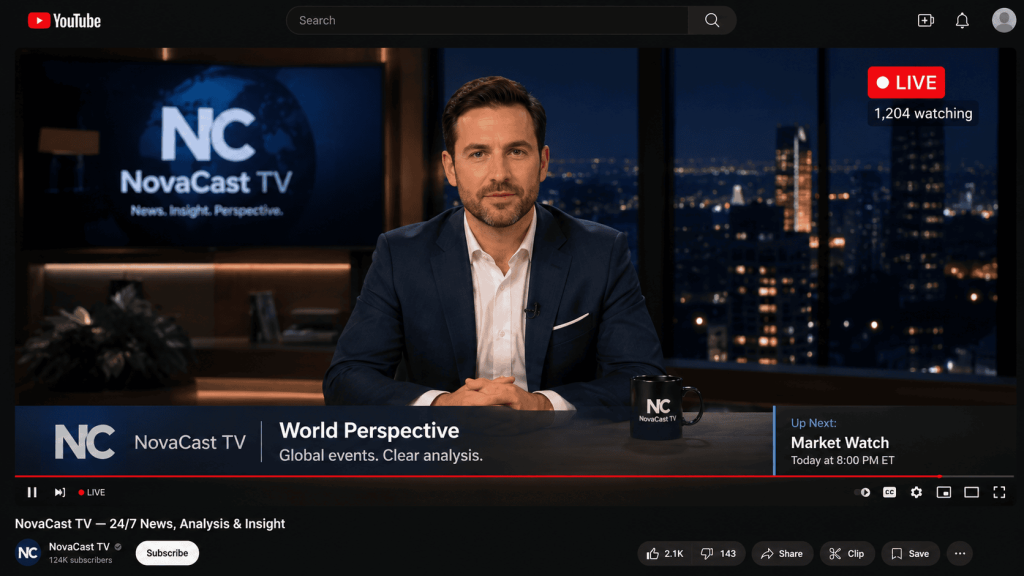
Compile your content library into a single MP4 file. Use a video editor (DaVinci Resolve is free and professional) to sequence segments, add transition cards between programs, and include a lower-third with your channel name and a “Next Up:” slate between sections. This makes the channel feel programmed rather than randomly assembled.
Export at 1080p H.264, AAC audio, 4,500 Kbps video bitrate.
4. A Streaming Platform
This is what actually pushes your compiled video to YouTube 24/7 without requiring your PC to stay on. More on this below.
The Best Platform for IPTV 24/7 Streaming
OBS Studio
OBS can handle IPTV-style streaming, but it requires a dedicated PC running 24/7 and offers no auto-reconnect. For a channel meant to feel like a real TV station, OBS going dark overnight is not an option.
VPS + FFmpeg
The most flexible option for advanced users. You can sequence multiple video files, schedule programs, and run complex encoding configurations. Requires significant Linux and FFmpeg knowledge to set up reliably.
StreamKite
For beginners building their first IPTV-style 24/7 channel on YouTube, StreamKite is the most practical starting point. Upload your compiled program loop, set your YouTube stream key, and your channel is live — from a browser, without a server admin skill set.
As your channel grows and your programming becomes more complex, you can migrate to a more technical setup. StreamKite is the right place to start.
Step-by-Step: Setting Up Your IPTV Channel with StreamKite
Step 1 — Compile Your Program Loop Video
Edit your content into a single long MP4 file. Add transition cards between segments (“Coming up next on NovaCast TV…”), include a channel logo watermark, and a lower-third with your channel branding. Export at 1080p H.264.
Step 2 — Configure YouTube
In YouTube Studio, create a persistent live stream. Title it to reflect your channel’s programming genre — “24/7 Tech News & Analysis — NovaCast Live” or “Classic Rock TV — 24/7 Live Music Channel.” Set the category that best matches your content.
Step 3 — Set Up StreamKite
Get your PassKey at streamkite.live, log in, open your stream slot, and upload your program loop video. Paste your YouTube stream key. Set output to 1080p at 4,500 Kbps.
Step 4 — Launch and Monitor
Start the stream and verify health in YouTube Studio’s Live Control Room. Once all indicators are green, your IPTV channel is broadcasting. Update your loop video weekly or monthly to keep the programming fresh.
Common Mistakes in IPTV Streaming for Beginners
Starting with too little content. A single 45-minute video looping feels amateur. Compile at least 4–6 hours of varied content for your launch loop. Variety is what makes it feel like a channel, not a single video on repeat.
Ignoring rights on third-party clips. Even a 30-second clip from a news broadcast or a movie trailer can trigger a Content ID claim that monetizes your channel for someone else. Always use original, licensed, or clearly rights-cleared content.
No channel branding in the video. Add a watermark and lower-thirds to every segment. A viewer who discovers your stream mid-broadcast should immediately know which channel they’re watching. Unbranded streams don’t build subscriber recognition.
Launching without testing. Run a private test stream for 30 minutes before going public. Check audio sync, video quality, transition timing, and stream health. Fix issues before your audience sees them.
Comparison Table: IPTV Streaming Platform Options
| Feature | OBS Studio | VPS + FFmpeg | StreamKite |
|---|---|---|---|
| PC required | ✅ Yes | ❌ No | ❌ No |
| Beginner-friendly | Medium | ❌ No | ✅ Yes |
| Auto-reconnect | ❌ No | Manual | ✅ Yes |
| Schedule multiple programs | Limited | ✅ With scripting | ✅ With slot management |
| Cost | Free + electricity | ~$5–10/mo | Affordable |
| Best for IPTV beginners | ❌ No | ❌ No | ✅ Yes |
FAQ — IPTV 24/7 Streaming for Beginners
1. Is IPTV streaming legal on YouTube?
Running an IPTV-style channel on YouTube is legal as long as you have the rights to all content you broadcast. Original content, properly licensed music and video, and Creative Commons content are all fair game. Broadcasting copyrighted TV shows, movies, or music without permission is a violation of YouTube’s Terms of Service and copyright law regardless of how it’s framed.
2. Do I need a broadcasting license to run an internet TV channel on YouTube?
In most countries, streaming over the internet via a platform like YouTube does not require a traditional broadcast license. You do still need to comply with the platform’s terms of service and applicable copyright laws. Consult a local media lawyer if you’re building a channel with significant commercial intent or broadcasting news content in a regulated market.
3. How do I make my IPTV channel look professional?
Channel branding (logo watermark, consistent lower-thirds), smooth transitions between segments, good audio levels throughout, and a regularly updated program loop are the four factors that separate professional-feeling channels from amateur ones. A professional custom thumbnail for the stream is also essential.
4. Can I run a 24/7 IPTV channel without any programming budget?
Yes, with original content. A news commentary channel where you film yourself analyzing current events, edit into weekly compilations, and loop on YouTube Live has zero content licensing cost. The production cost is your time and basic equipment (a camera, a microphone, basic lighting). Many successful independent channels operate this way.
5. What bitrate should I use for an IPTV live stream on YouTube?
4,500 Kbps for 1080p 30fps is YouTube’s recommended standard for live streaming. If your content includes fast motion (sports highlights, action sequences), use 6,000–8,000 Kbps to prevent compression artifacts. For talking-head or mostly static content, 3,000 Kbps looks clean at 1080p.
6. How do I grow an IPTV-style YouTube channel?
Treat it like a media brand, not just a YouTube channel. Post consistently about your programming on Twitter/X and relevant subreddits. Engage with your live chat to build community. Update your loop video regularly to give subscribers a reason to return. Cross-promote with creators in adjacent niches.
7. Can I schedule different content at different times of day?
With StreamKite, you can manage your loop video and swap content as needed. For more granular scheduling (specific shows at specific hours), a VPS with a scripted FFmpeg playlist is the more powerful setup. For a beginner starting out, a well-compiled single loop video updated regularly is sufficient.
8. How do I monetize an IPTV live stream channel?
Once you reach YouTube Partner Program thresholds (1,000 subscribers, 4,000 watch hours), you can enable ads on your live stream. Beyond ads: Super Chats, channel memberships, sponsor segments within your program loop, and affiliate links in the stream description are all viable revenue streams for an IPTV-style channel.
Start Your 24/7 IPTV Channel Today
Running your own internet TV channel on YouTube is more achievable than most creators realize. The tools exist, the audience is there, and the algorithm rewards exactly the kind of long-session viewing that IPTV-style channels produce.
StreamKite lets you run a 24/7 live stream from any device without keeping your PC on. No technical knowledge needed. Setup takes under 5 minutes.
Start your 24/7 loop stream today
Run a nonstop YouTube live stream from any device.
No PC required. No technical knowledge needed.