Starting a lofi music channel on YouTube is one of the most achievable creator businesses right now — if you get the streaming setup right from day one.
Most beginners waste weeks troubleshooting OBS crashes, encoding errors, and streams that go down every few days. The setup itself becomes the obstacle.
This guide gives you the best streaming setup for lofi music channels in 2026 — from audio production to visual creation to the exact platform that keeps your stream running 24/7 without a PC left on.
What Makes a Lofi Channel Setup Different From Regular Streaming
A standard YouTube live stream is designed for short sessions — a gaming stream that runs a few hours, a talk show that ends after an episode. The streamer is present the whole time.
A lofi music channel runs a continuous lofi music stream that never stops. Nobody is watching the encoder. Nobody is checking for crashes. The setup has to be self-sufficient.
That changes every decision you make — from your encoding settings to your platform choice to how long your loop video is.
If you’re new to the concept of looping pre-recorded content as a live stream, start with our guide on how to stream pre-recorded videos live on YouTube before building your setup.
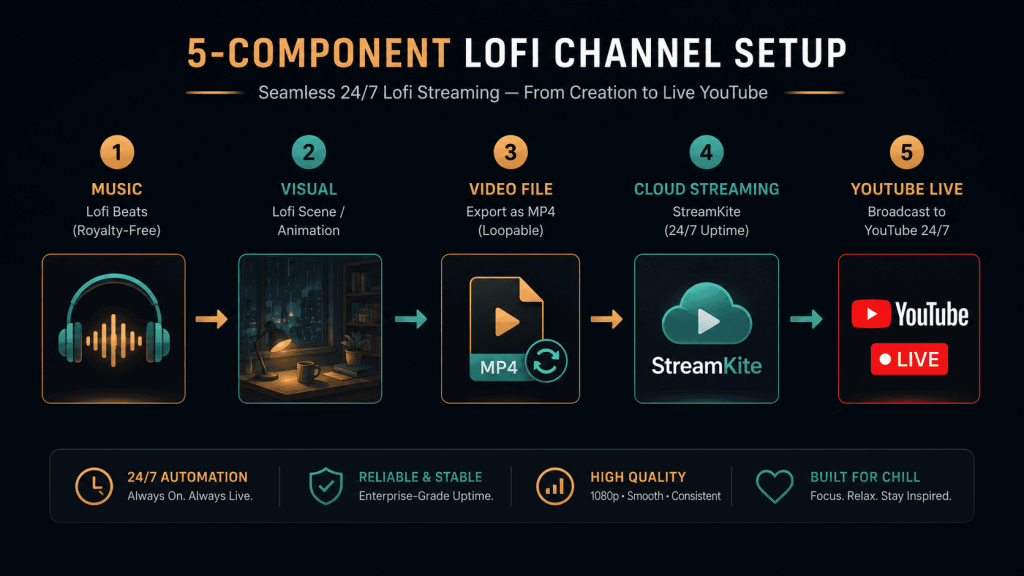
The 5 Components of a Great Lofi Channel Streaming Setup
1. The Music
You have two paths: make it or license it.
Making your own gives you the best long-term position — full monetization, no Content ID risks, and a unique sound. Lofi production in a DAW (FL Studio, Ableton, Logic) typically involves: a chord progression played on a jazz piano VST, a lo-fi drum loop with vinyl crackle, a bass line, and subtle reverb/saturation for warmth. The genre is intentionally simple, which makes it accessible even for producers early in their learning curve.
Licensing beats is the faster start. Platforms like Musicbed, Artlist, and individual producers on Bandcamp offer streaming licenses. Always confirm the license covers YouTube live streaming, not just video uploads. Some licenses explicitly exclude live streaming — check before you pay.
2. The Visual
The animated lofi aesthetic — a character studying at a desk, rain on the window, a glowing city at night — is what makes lofi streams instantly recognizable. You don’t have to copy it exactly, but your visual needs to communicate the same mood: cozy, nocturnal, focused.
Your options from lowest to highest investment:
- Static illustrated scene — beautiful illustration, no animation. Cheapest to produce. Works well for a first launch.
- Looping animation (30–60 sec) — the classic format. Commission from a motion designer on Fiverr or Upwork. Cost: $80–$500 depending on complexity.
- AI-generated visuals — tools like Runway ML and Pika Labs can generate short looping video clips from text prompts. Lower cost, but requires curation to get the right aesthetic.
3. The Loop Video File
Combine your audio and visual into a single MP4. Target specs for a best-in-class lofi YouTube live stream setup:
- Codec: H.264 video + AAC audio
- Resolution: 1920×1080 at 30fps (or 24fps for a film-like feel)
- Video bitrate: 4,500 Kbps
- Audio bitrate: 320 Kbps stereo
- Duration: 1–3 hours minimum
4. The Streaming Platform
This is the most important decision in your entire setup. The streaming platform is what keeps your 24/7 lofi stream running — or lets it die. More on this below.
5. Your YouTube Channel Configuration
Even before you go live, your channel setup matters for discoverability. Your channel name, channel description, and stream title should all include lofi-relevant keywords. Channels that show up in YouTube search for “lofi beats to study to” all have these terms throughout their metadata — not just in the video title.
Choosing the Right Streaming Platform for Lofi Channels
OBS Studio
OBS is free and well-known. It can loop a media source file to YouTube. But it requires your PC to stay powered on around the clock, has no auto-reconnect by default, and crashes on long sessions — especially on laptops not designed for continuous operation. It’s a starting point, not a permanent solution for a lofi channel streaming setup.
VPS + FFmpeg
A rented cloud server running FFmpeg is how most large established lofi channels stream. It’s reliable, cheap ($5–10/month), and runs independently of your home hardware. The barrier is technical: you need Linux experience and custom crash recovery scripts. If you’re not a developer, this setup will cost more in time than it saves in money.
StreamKite
StreamKite is the best streaming setup for lofi music channels that want to focus on creating music rather than managing infrastructure. Upload your loop video, paste your YouTube stream key, and it runs — automatically, in the cloud, with crash recovery built in. You can manage the whole thing from your phone.
For a lofi creator whose core skill is music production, not server administration, this is the clear winner.
Step-by-Step: The Complete Lofi Channel Streaming Setup with StreamKite
Step 1 — Enable YouTube Live Streaming
Verify your YouTube account for live streaming in YouTube Studio under Create → Go Live. This is a one-time step that takes up to 24 hours to activate.
Step 2 — Create Your Persistent Stream
- In YouTube Studio, go to Go Live → Manage → Create Stream
- Title: “[Your vibe] lofi hip hop beats to study/relax to 🎵 24/7 live”
- Category: Music
- Select Persistent stream key
- Copy the stream key
Your stream title is a critical SEO asset. Use the phrase “lofi hip hop beats” and “24/7 live” — these are high-search terms in this niche. Add an emoji to improve click-through rate in YouTube search results.
Step 3 — Upload to StreamKite and Launch
Log in at streamkite.live with your PassKey. In your stream slot, upload the loop MP4 and paste your YouTube stream key. Set your output to 1080p at 4,500 Kbps and hit Start. Your lofi channel streaming setup is now live and will run without intervention until you stop it.
Optimizing Your Lofi Channel for Growth
Update your loop video monthly. YouTube favors channels with regular activity. Replacing your stream video monthly signals that the channel is maintained. Tell your subscribers via a Community Post — it drives clicks to the stream and improves its position in YouTube’s recommendation engine.
Use YouTube’s stream scheduling feature. Instead of keeping a single stream live indefinitely, some creators schedule a fresh stream every week or month with a new title. Each new stream event can be promoted separately, driving fresh traffic.
Engage in the lofi community. Reddit’s r/weddingmusic, r/ambientmusic, and r/lofi are communities where your target audience lives. Share your stream link with genuine context — “just launched a 24/7 chill beats stream, here’s the link if anyone wants background music for studying.”
Collab with other small lofi channels. Comment swapping, shoutouts, and joint playlists are how small lofi channels cross-pollinate audiences in the early growth phase. The lofi community is notably collaborative compared to other YouTube niches.
Common Lofi Channel Setup Mistakes
Skipping the music license check. The biggest mistake, and the most costly. A single unlicensed track can get your stream muted, claimed, or taken down. Always confirm licenses cover YouTube live streaming before you go live.
Choosing the wrong stream key type. Use a persistent stream key — not a scheduled event key. Event keys expire after the event window, taking your stream offline mid-loop. Persistent keys stay active indefinitely.
Setting bitrate too high for your plan. Pushing 8,000 Kbps when your streaming plan supports 4,500 Kbps causes stuttering and drops. Match your bitrate to your plan limits.
Using a loop video shorter than 60 minutes. Regular listeners notice when the music restarts. A 15-minute loop heard during a 2-hour study session restarts 8 times. Every restart is a moment the viewer might leave. Longer is always better.
Neglecting the thumbnail. Many new lofi channels launch with a blurry screenshot as the thumbnail and wonder why nobody clicks. Custom illustrated thumbnails in the lofi aesthetic double and triple click-through rates. It’s one of the highest-ROI investments you can make early on.
Comparison Table: Streaming Platform Options for Lofi Channels
| Feature | OBS Studio | VPS + FFmpeg | StreamKite |
|---|---|---|---|
| PC needed to run | ✅ Yes | ❌ No | ❌ No |
| Setup time | 30–60 min | 2–4 hours | Under 5 min |
| Auto crash recovery | ❌ No | Manual | ✅ Automatic |
| Manage from phone | ❌ No | ❌ No | ✅ Yes |
| Cost | Free + electricity | ~$5–10/mo | Affordable |
| Best for lofi channels | Short sessions only | Developers only | ✅ Yes |
FAQ — Streaming Setup for Lofi Music Channels
1. How much does it cost to start a lofi channel from scratch?
Minimum budget: $0 if you use free music production tools (LMSS, GarageBand), create a static visual in Canva, and run OBS. Mid-range: $100–$300 for a licensed beat pack, a commissioned lofi animation, and StreamKite for reliable hosting. The mid-range budget produces a significantly more professional result that competes with established channels.
2. What’s the best DAW for making lofi beats?
FL Studio is the most popular in the lofi community — its step sequencer and plugin ecosystem suit the genre well. Ableton Live is preferred by producers who want more performance flexibility. Logic Pro X is the top choice for Mac users. All three are industry-standard and produce identical results at a professional level.
3. Can I use Spotify or Apple Music songs in my lofi live stream?
No. Spotify and Apple Music tracks are commercially licensed for personal listening only. Using them in a YouTube live stream, monetized or not, is a copyright violation. YouTube Content ID will find them and either mute your stream or redirect all revenue to the rights holder.
4. How many streams can I run simultaneously on StreamKite?
This depends on your StreamKite plan. Some plans allow multiple simultaneous slots, which enables running different lofi sub-channels (study beats, sleep beats, jazz lofi) from a single account. Check streamkite.live for current plan details.
5. What’s the best video length for a lofi loop?
For study/focus streams: 1–2 hours. For sleep streams: 4–8 hours. Many top lofi channels compile their tracks into a single long video and loop that — this creates a natural variety even on repeat while still playing continuously without obvious restarts.
6. Will YouTube demonetize my lofi channel for running a loop stream?
Not inherently — but YouTube does review streams for ad suitability. Original music, quality visuals, and a properly maintained channel with good community standards keeps monetization active. Channels that have faced demonetization on loop streams are almost always running unlicensed content or have other policy violations on the channel.
7. How long does it take to grow a lofi channel to monetization?
Timelines vary widely, but lofi channels that run 24/7 streams consistently typically reach 1,000 subscribers and 4,000 watch hours within 3–9 months if they actively share the stream in communities. Channels that only rely on organic YouTube discovery take longer. External promotion in the early months is the biggest accelerator.
8. Should I start one channel or multiple niche lofi channels?
Start with one. Build a consistent brand and audio identity before expanding. Multiple channels split your energy and make it harder to reach the algorithm thresholds that trigger YouTube recommendations. Once your first channel is monetized and growing steadily, a second niche channel (e.g., jazz lofi, city pop lofi) makes strategic sense.
Start Your 24/7 Lofi Stream Today
The lofi music niche on YouTube has room for new channels — but only for those who set up correctly and stay consistent. A shaky stream that goes offline every few days doesn’t build an audience. A 24/7 stream that’s always there does.
StreamKite lets you run a 24/7 live stream from any device without keeping your PC on. No technical knowledge needed. Setup takes under 5 minutes.
Start your 24/7 loop stream today
Run a nonstop YouTube live stream from any device.
No PC required. No technical knowledge needed.