

RTMP — Real-Time Messaging Protocol — is the delivery system underneath every YouTube live stream. It’s what carries your video data from your encoder to YouTube’s servers. And when it’s unstable, your stream drops, buffers, or dies entirely.
Keeping an RTMP stream stable 24/7 requires understanding how the protocol works, what makes it fail, and how to configure both your encoder and your network to maintain a clean session indefinitely.
How RTMP Stability Works
An RTMP live stream is a persistent TCP connection between your encoder and YouTube’s ingest server. The encoder continuously sends chunks of audio/video data. The server acknowledges receipt. If either side misses acknowledgments for too long — due to packet loss, latency spikes, or encoder stalls — the connection times out and the stream ends.
The key word here is “persistent.” RTMP isn’t like a web request that completes and closes. It stays open continuously, which means any disruption in the underlying TCP session terminates the stream rather than just delaying it. This architecture is why RTMP stability requires ongoing attention, not just a one-time setup check.
For a full architectural explanation of how streaming pre-recorded content works over RTMP, see how to stream pre-recorded videos live on YouTube.
RTMP Stability Factor #1: Network Packet Loss
TCP handles packet loss by retransmitting dropped packets — but this retransmission takes time and adds latency to the stream delivery. When packet loss is high enough, the retransmission queue grows faster than it can be cleared, causing the RTMP session to stall and eventually time out.
For stable 24/7 RTMP streaming, your network packet loss to YouTube’s ingest servers should be at or as close to 0% as possible. Even 0.5% packet loss can cause periodic RTMP instability during a 24/7 stream.
Measuring packet loss to YouTube’s RTMP servers:
ping -n 100 a.rtmp.youtube.comOn Windows. On Linux/Mac: ping -c 100 a.rtmp.youtube.com. Check the “packet loss” line at the end. Anything above 0% warrants investigation.
Fixes for packet loss:
- Switch from WiFi to wired ethernet (eliminates wireless packet loss)
- Replace aging ethernet cables (degraded Cat5 cables cause packet loss that Cat5e or Cat6 don’t)
- Restart your modem (modems accumulate connection state issues over weeks of operation)
- Contact your ISP if packet loss persists after physical layer fixes
RTMP Stability Factor #2: Consistent Bitrate Output
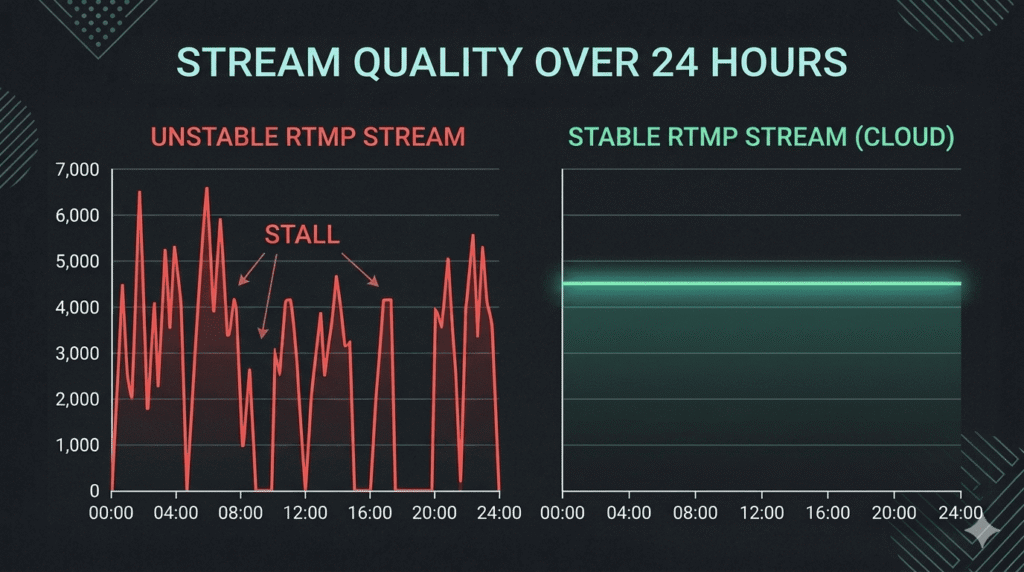
RTMP expects a continuous, consistent flow of data. Bitrate spikes — where your encoder suddenly sends 3× the normal data rate — can overwhelm the RTMP buffer and cause connection instability. Bitrate drops — where almost no data is sent for a second or two — can trigger YouTube’s ingest server to time out the connection.
Configuration for consistent bitrate:
- Always use CBR (Constant Bitrate) mode. VBR output is fundamentally incompatible with stable RTMP streaming.
- Set a buffer size 2× your bitrate in FFmpeg (
-bufsize 9000kfor 4,500 Kbps) to smooth out momentary encoder variations. - Pre-encode your loop video at stream settings and remux it rather than re-encoding in real time. A pre-encoded file produces perfectly consistent CBR output.
RTMP Stability Factor #3: Connection Latency and Route Quality
The network path between your encoder and YouTube’s RTMP ingest server matters. High latency (above 100–150ms) or an unstable route (where packets take inconsistent paths) adds overhead to the TCP acknowledgment cycle, which can cause RTMP sessions to stall under load.
Optimizing your RTMP route:
- Use YouTube’s nearest ingest server. The default
a.rtmp.youtube.comroutes automatically, but you can try specific regional endpoints if you’re getting high latency to the default. - Run a traceroute to diagnose routing issues:
tracert a.rtmp.youtube.comon Windows ortraceroute a.rtmp.youtube.comon Linux/Mac. Look for hops with high or variable latency — these indicate routing problems between you and YouTube. - Avoid routing through VPNs. VPNs typically increase latency by 20–100ms and add routing overhead that directly impacts RTMP session stability.
RTMP Stability Factor #4: Auto-Reconnect Configuration
Even a perfectly configured RTMP setup will occasionally drop — YouTube has brief ingest issues, ISPs have momentary blips, hardware has transient errors. Auto-reconnect is what separates a 24/7 stream from one that goes offline every time something minor happens.
OBS auto-reconnect (Settings → Stream):
- Reconnect Delay: 2 seconds
- Maximum Retry Attempts: 20
FFmpeg auto-reconnect:
ffmpeg -re -stream_loop -1 -i input.mp4 \
  -reconnect 1 -reconnect_at_eof 1 \
  -reconnect_streamed 1 -reconnect_delay_max 5 \
  -c:v copy -c:a copy \
  -f flv rtmp://a.rtmp.youtube.com/live2/YOUR_KEY
The -reconnect flags tell FFmpeg to automatically retry the RTMP connection if it drops, with up to 5-second delay between attempts. This keeps your stream live through brief interruptions without manual intervention.
RTMP Stability Factor #5: The Ingest Server Timeout Behavior
YouTube’s RTMP ingest has specific behavior around stream health. If your incoming bitrate drops below approximately 80% of your configured bitrate for more than 30–60 seconds, YouTube’s server may terminate the session. This is designed to clear dead sessions but can inadvertently end a stream that’s experiencing a temporary encoder slowdown.
Protection against timeout termination:
- Keep encoding load below 80% CPU capacity to ensure consistent bitrate delivery even when the system experiences other load spikes
- Use hardware encoding (NVENC/AMF) which is less susceptible to CPU-related bitrate drops
- Pre-encode your source file to eliminate real-time encoding variability entirely
The Ultimate RTMP Stability Solution
The most stable RTMP stream is one pushed from a server with a dedicated gigabit connection to YouTube’s ingest network, running on hardware with no competing workloads, with automatic reconnection at the platform level.
That describes StreamKite’s infrastructure. The RTMP session between StreamKite’s servers and YouTube is orders of magnitude more stable than anything a home connection can deliver — no packet loss, no congestion, no competing processes, datacenter-grade hardware and connectivity.
RTMP Stability Checklist
| Factor | Optimal Setting | How to Check |
|---|---|---|
| Packet loss | 0% | ping -c 100 a.rtmp.youtube.com |
| Latency to ingest | <50ms | ping a.rtmp.youtube.com |
| Bitrate mode | CBR only | OBS Output settings |
| Keyframe interval | 2 seconds | OBS Output / FFmpeg -g flag |
| Auto-reconnect | Enabled, 2s delay, 20 retries | OBS Stream settings |
| Buffer size | 2× bitrate | FFmpeg -bufsize argument |
| B-frames | 0 for compatibility | OBS Advanced Encoder settings |
| Connection type | Wired ethernet | Physical check |
FAQ — Keeping RTMP Streams Stable 24/7
1. What RTMP URL should I use for the most stable YouTube connection?
For most users, rtmp://a.rtmp.youtube.com/live2/ is the primary endpoint and routes to the nearest YouTube ingest server automatically. Alternative endpoints (b.rtmp.youtube.com, c.rtmp.youtube.com) are available if the primary shows instability. The stream key remains the same — only the server URL changes. YouTube’s documentation lists all available ingest endpoints.
2. Does using RTMPS (encrypted RTMP) improve stability?
RTMPS adds TLS encryption to the RTMP stream. YouTube supports both RTMP and RTMPS. RTMPS adds a small amount of CPU overhead for encryption/decryption but provides better security and works through corporate firewalls that block unencrypted RTMP traffic. For home streaming on a trusted network, the stability difference is negligible. For enterprise or network-managed environments where RTMP traffic might be blocked, RTMPS is more reliable.
3. Why does my FFmpeg RTMP stream drop exactly every 6 hours?
A predictable 6-hour drop often indicates a TCP session timeout at the network level — some routers and ISP infrastructure refresh connection state tables on a 6-hour cycle, which can terminate long-lived TCP sessions. The fix is using the FFmpeg reconnect flags (-reconnect 1 -reconnect_at_eof 1) so FFmpeg automatically re-establishes the session when the underlying TCP connection is reset.
4. Can I run two RTMP streams to YouTube simultaneously for redundancy?
YouTube doesn’t support simultaneous ingest from two sources to the same stream key. You can use backup stream keys and switch between them, or use a third-party multi-stream service that manages failover between ingest points. For most 24/7 automated streams, auto-reconnect on a single connection provides sufficient redundancy — true dual-ingest redundancy is typically only needed for high-stakes live events.
5. Does TCP vs UDP affect RTMP stability?
Standard RTMP runs over TCP. TCP’s guaranteed delivery and retransmission makes it more reliable for streams over imperfect networks — packet loss doesn’t cause permanent data loss, it just causes retransmission delays. Some newer streaming protocols use UDP (WebRTC, SRT) and handle packet loss differently. For YouTube live streaming, RTMP over TCP is the standard — UDP-based alternatives aren’t natively supported by YouTube’s public ingest infrastructure.
6. How do I test RTMP connection quality before starting a 24/7 stream?
Run OBS or FFmpeg with your target bitrate for 30–60 minutes before committing to an unattended run. Watch dropped frames (in OBS Stats), bitrate fluctuation (in YouTube Studio Live Control Room), and connection health indicators throughout. A stream that shows green health consistently for 60 minutes is unlikely to have stability issues from network or encoding factors during extended operation.
7. Why does my RTMP stream drop only when other people are using the internet in my house?
Shared home bandwidth is being consumed by other users/devices, reducing the upload headroom available for your stream. When total upload demand exceeds your connection’s capacity, your stream’s bitrate suffers first (since streaming traffic typically doesn’t have QoS priority). Fix: enable QoS on your router to give your streaming PC’s traffic priority, or reduce your stream bitrate to leave more headroom for shared usage.
8. Is there a difference in RTMP stability between YouTube and Twitch?
Yes. YouTube’s RTMP ingest infrastructure is generally more geographically distributed and better optimized for long-running streams than Twitch’s. YouTube is also better suited for 24/7 automated streams because of persistent stream keys and a platform designed for extended broadcast sessions. Twitch’s ingest is excellent for interactive gaming streams but not optimized for the multi-week unattended operation that 24/7 channel streaming requires.
RTMP Stability Without the Configuration Overhead.
Every setting in this guide matters for local streaming setups. With cloud streaming, most of them are managed at the infrastructure level — you set the bitrate once, and the platform handles everything else.
StreamKite lets you run a 24/7 live stream from any device without keeping your PC on. No technical knowledge needed. Setup takes under 5 minutes.
Start your 24/7 loop stream today
Run a nonstop YouTube live stream from any device.
No PC required. No technical knowledge needed.
