

Pre-recorded loop streams are one of the most reliable forms of 24/7 content — but only when the connection carrying them to YouTube stays stable. An internet drop that lasts 60 seconds can end your stream entirely, turning a perfectly healthy loop into an offline channel until you manually restart it.
This guide covers every strategy for streaming pre-recorded content without internet drops disrupting your 24/7 stream — from home network hardening to connection redundancy to eliminating home internet dependency entirely.
Why Pre-Recorded Stream Connections Drop Differently Than Live Streams
A pre-recorded loop stream pushes a continuous RTMP connection to YouTube. Unlike an interactive live stream where a brief reconnect has minimal impact (viewers assume the streamer paused), a 24/7 loop stream that drops is supposed to be running automatically. Nobody is there to restart it. The stream stays offline until the next time you check — which might be 8 hours later.
This makes connection stability more critical for pre-recorded streams than for supervised live streams. The tolerance for brief drops is zero when you’re not present to restart.
The core mechanics of pre-recorded streaming and why connection stability matters so much are covered in detail at our guide on how to stream pre-recorded videos live on YouTube.
Stability Layer 1: Harden Your Physical Connection
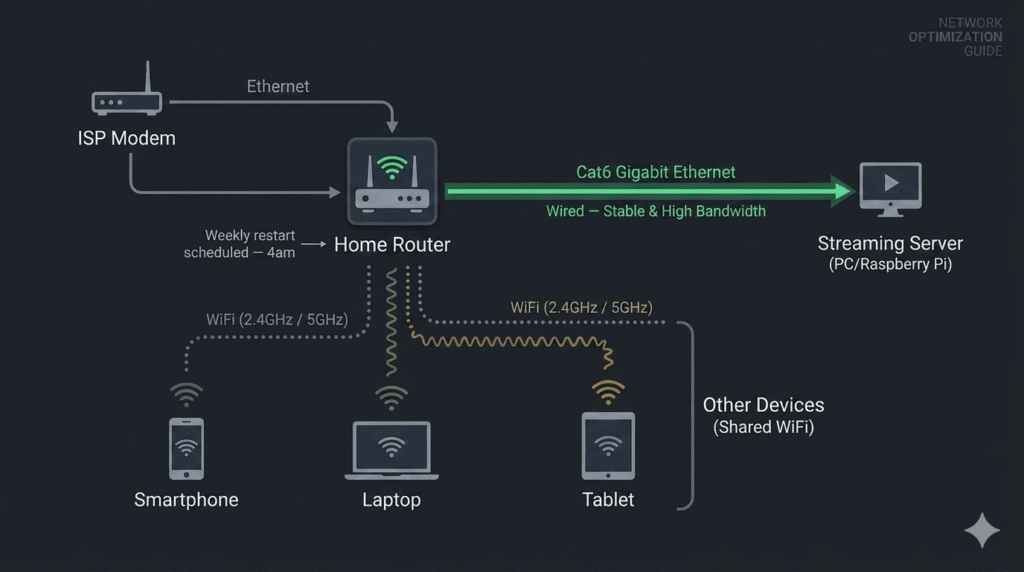
The vast majority of home streaming connection drops come from the physical and link layer — the actual cables, router hardware, and ISP modem, not the internet service itself.
Ethernet cable quality and condition
Old Cat5 cables (vs Cat5e or Cat6) have higher error rates at Gigabit speeds. Cables with bent, crimped, or damaged connectors cause packet loss that increases progressively as the cable degrades. Replace any ethernet cable that’s more than 5 years old, has visible damage, or runs a path where it might be stepped on or bent repeatedly. Cat6 cables cost $10–15 for 10 feet and last a decade or more under normal conditions.
Router and modem age and condition
Consumer routers and modems have operational lifespans of 3–5 years. After that, connection state tables fill more slowly, firmware support ends, and hardware degradation increases the frequency of micro-disconnections. If your router or modem is over 4 years old and you’re experiencing regular connection drops, hardware replacement is worth considering before any software configuration changes.
Scheduled router restart
Most consumer routers allow configuring an automatic restart at a scheduled time (typically in the router’s admin panel under Maintenance or Administration). A weekly scheduled restart at 4am clears accumulated connection state, refreshes DHCP leases, and keeps the router’s firmware in a clean state. This alone reduces connection drop frequency for many home setups.
Stability Layer 2: Configure Automatic Reconnection
No home network is 100% reliable. The second layer of defense is ensuring that when a brief drop occurs, the stream automatically reconnects without waiting for your intervention.
OBS Auto-Reconnect (Settings → Stream):
- Reconnect Delay: 2 seconds
- Maximum Retry Attempts: 20
FFmpeg Reconnect Flags:
ffmpeg -re -stream_loop -1 -i loop.mp4 \
  -reconnect 1 \
  -reconnect_at_eof 1 \
  -reconnect_streamed 1 \
  -reconnect_delay_max 5 \
  -c:v copy -c:a copy \
  -f flv rtmp://a.rtmp.youtube.com/live2/YOUR_KEY
With these flags, FFmpeg automatically retries the RTMP connection up to 5 seconds between attempts if it drops. A 60-second internet outage results in automatic reconnection and stream resumption without any manual action — most viewers won’t notice the brief interruption.
Systemd Restart Policy (for VPS or Pi setups):
Restart=always
RestartSec=5
In your systemd service file. This restarts the entire FFmpeg process if it exits for any reason — including if FFmpeg itself crashes rather than just the RTMP connection dropping.
Stability Layer 3: ISP-Level Stability Improvements
If your ISP connection itself is unstable — not your home network hardware — there are a few approaches:
Upgrade to a business internet plan
Business internet plans from ISPs typically include an SLA (Service Level Agreement) for uptime — something residential plans don’t. Business connections are also often on different infrastructure with higher reliability and faster response time for repair. Cost is higher (typically 1.5–3× residential), but for a channel where uptime directly affects revenue, the improved SLA is worth evaluating.
Use a 4G/5G backup connection
A 4G/5G router or mobile hotspot as a backup connection, managed by network bonding software like Speedify or Connectify, can automatically fail over your stream connection from your primary ISP to mobile data if the primary drops. The failover typically takes 1–3 seconds — fast enough to reconnect within YouTube’s RTMP grace period. Monthly mobile data cost is the limitation, but for a channel where a single 6-hour outage costs significant revenue, the insurance premium may be worthwhile.
Stability Layer 4: Move the Stream to Infrastructure That Doesn’t Use Your Internet
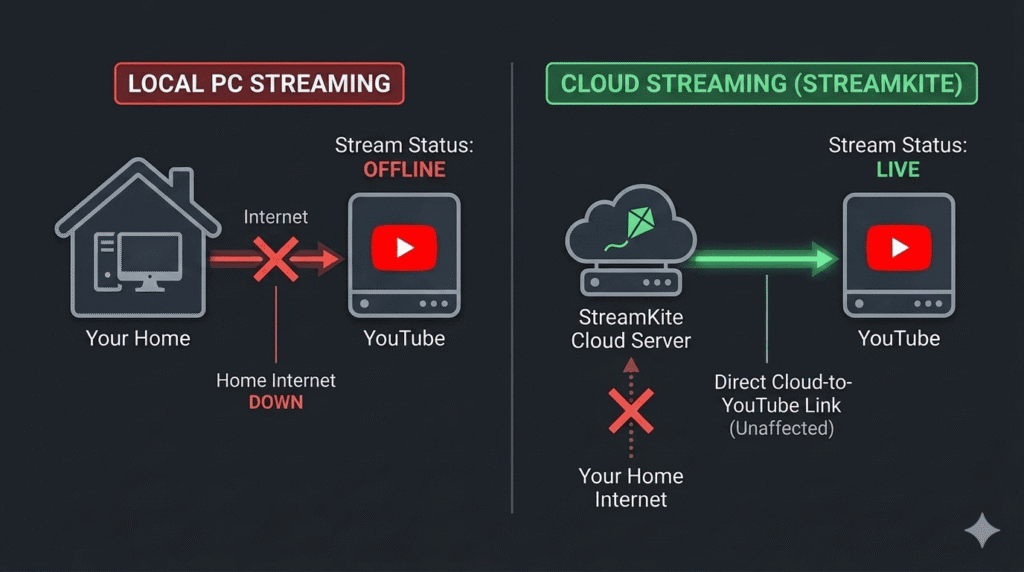
The most complete solution to internet drop instability is running your stream from a location where your home internet connection is completely irrelevant to stream continuity.
When your pre-recorded loop runs from StreamKite’s cloud infrastructure:
- Your home internet can go down for hours — the stream stays live
- Your ISP can perform overnight maintenance — the stream stays live
- Your router can restart — the stream stays live
- You can travel internationally with no home internet running — the stream stays live
The only internet connection that matters is the datacenter-to-YouTube connection, which runs over dedicated fiber links with redundant routing that doesn’t share any infrastructure with your home broadband.
Internet Drop Protection Strategy — Layered Approach
| Layer | What It Fixes | Effort | Cost |
|---|---|---|---|
| Wired ethernet + cable quality | WiFi and cable drops | Low | $10–15 |
| Router restart schedule | Router state accumulation | Very Low | Free |
| Auto-reconnect (OBS/FFmpeg) | Brief connection drops (<40s) | Low | Free |
| QoS router configuration | Bandwidth contention | Medium | Free |
| 4G/5G failover | Primary ISP outages | Medium | $20–40/mo |
| Cloud streaming (StreamKite) | All home internet issues | Very Low | Affordable |
FAQ — Streaming Pre-Recorded Content Without Internet Drops
1. How long does my internet need to be down before my stream ends?
YouTube’s RTMP ingest has a reconnect grace period of approximately 30–60 seconds. If your connection is restored within that window and you have auto-reconnect enabled, the stream continues without ending. If the outage lasts longer than the grace period, YouTube ends the live stream session and the stream appears offline. You (or auto-restart scripts) must start a new RTMP session to resume.
2. Can I pre-buffer my loop video to protect against brief internet drops?
Not in the traditional sense — RTMP doesn’t support look-ahead buffering on the encoder side. However, the FFmpeg -bufsize parameter creates a bitrate averaging buffer that absorbs brief encoding hiccups and normalizes output bitrate. This protects against encoder-side micro-stutters but doesn’t protect against actual internet disconnections. Auto-reconnect is the correct tool for the latter.
3. My stream drops at 3am every night — is that my ISP doing maintenance?
Possibly. Many ISPs perform DHCP lease renewals, firmware updates, and maintenance operations during low-traffic overnight windows. These operations can briefly interrupt connections. Check your router’s WAN log for disconnection events at the relevant times. If you see ISP-side reconnections in the log matching your stream drops, contact your ISP and ask about their maintenance schedule — some allow customers to opt out of or reschedule automatic firmware updates.
4. Does fiber internet have fewer stream drops than cable or DSL?
Generally yes. Fiber internet has lower packet loss, more consistent latency, and better sustained upload speeds than cable or DSL connections of comparable rated speed. For 24/7 streaming specifically, fiber’s superior upload consistency makes it meaningfully better for stream stability. If fiber is available in your area and you’re experiencing frequent drops on cable/DSL, upgrading is worth considering for the upload stability improvement alone.
5. Can I monitor my internet connection for drops automatically?
Yes. Tools like Pingplotter run continuous latency and packet loss monitoring to multiple endpoints and log the results with timestamps. Running Pingplotter continuously on your streaming machine shows you exactly when your connection quality degrades, for how long, and how severe the drops are. This data is invaluable for identifying whether you have an ISP issue, a router issue, or a local network issue causing your stream drops.
6. Is there a way to stream 24/7 with no home internet at all?
Yes — with cloud streaming, the stream runs entirely on remote infrastructure. Your home internet is only needed to initially upload your loop video to the platform and to manage the stream via the dashboard. After that, your home internet can be disconnected entirely and the stream continues unaffected. Some creators in areas with unreliable internet specifically use cloud streaming to decouple their channel’s uptime from their local connection quality.
7. How do I restart my stream automatically if it drops despite all precautions?
On a local PC: a Windows Task Scheduler job or Python script that monitors your YouTube channel’s live status via the YouTube Data API and relaunches OBS/FFmpeg when the stream is detected as offline. On a VPS: the systemd Restart=always policy handles FFmpeg crashes; YouTube RTMP session drops are handled by FFmpeg’s -reconnect flags. These layers combined give you near-automatic recovery for most drop scenarios.
8. Does changing my DNS servers improve streaming stability?
Marginally. DNS affects how quickly your system resolves YouTube’s RTMP server hostname to an IP address. Once the RTMP connection is established, DNS is no longer involved. Faster DNS (1.1.1.1 by Cloudflare, 8.8.8.8 by Google) reduces the time to establish a new connection after a drop — from 100–500ms to 5–20ms. This is beneficial for auto-reconnect speed but has no effect on connection stability during an established stream session.
Stop Depending on Your Home Internet. Stream From the Cloud.
Every mitigation in this guide assumes your stream runs through your home connection. The moment you move it to cloud infrastructure, every internet drop issue at home becomes irrelevant.
StreamKite lets you run a 24/7 live stream from any device without keeping your PC on. No technical knowledge needed. Setup takes under 5 minutes.
Start your 24/7 loop stream today
Run a nonstop YouTube live stream from any device.
No PC required. No technical knowledge needed.
