

DJs have one of the most complicated relationships with live streaming of any content category — and most platforms don’t help.
You play a set, it gets taken down for music rights violations. You stream on Twitch, it gets muted. You try YouTube, and two tracks in, your stream is flagged.
This guide cuts through the noise. It covers the best live streaming platforms for DJs in 2026, how to protect your sets from copyright takedowns, and how the smartest DJ channels are running 24/7 streams without their music being muted or removed.
The Music Rights Problem Every DJ Streamer Faces
Before comparing platforms, you need to understand the fundamental challenge of DJ live streaming: almost all commercial music is protected by copyright, and most streaming platforms enforce it automatically.
YouTube uses Content ID. Twitch uses audio recognition software that mutes VOD recordings of streams. Facebook uses its own audio matching tool. When you play a track from a major label in a live set, these systems detect it — and either mute it, issue a claim, or take down the stream entirely.
There are two ways DJ streamers work around this:
Play music you have rights to. This means original productions, bootlegs and remixes you produced yourself, or music from labels that have explicitly cleared YouTube streaming (many underground and independent labels do this). Platforms like Amuse, Defected, and STMPD RCRDS have YouTube partnerships that allow streaming their catalog.
Use platforms specifically designed for licensed DJ streaming. Some platforms (Mixcloud, Beatport LINK) have negotiated blanket licenses that cover DJ mixes. These aren’t YouTube, but they solve the rights problem for sets built on commercial music.
For building a long-term YouTube presence — which is where the largest audience and monetization potential live — the strategies in this guide focus on rights-compliant streaming.
For the full technical breakdown of how continuous DJ content streams work on YouTube, see our guide on how to stream pre-recorded videos live on YouTube.
Platform Comparison: Best Options for DJ Live Streaming
YouTube Live
Best for: Building a permanent audience and monetizing long-term.
YouTube is the largest video platform on earth and offers the best monetization options for creators. For DJs with rights-compliant music, YouTube Live is the strongest long-term platform choice.
The biggest advantage beyond audience size: YouTube’s recommendation algorithm can put your DJ stream in front of tens of thousands of listeners who don’t know you yet — no other platform does this as effectively.
Running a 24/7 DJ stream on YouTube (a recorded mix looping continuously) requires a streaming setup that doesn’t depend on your home hardware. More on this below.
Twitch
Best for: Interactive, real-time DJ performances with a gaming-adjacent audience.
Twitch has a dedicated music section and a culture of tipping (Bits) and subscriptions. Live sets perform well for interactive DJs who take requests, interact heavily with chat, and build community in real time. The downside: Twitch VODs of sets containing commercial music are automatically muted after the live event, which limits the long-term reach of each set. Twitch also doesn’t recommend content the way YouTube does — you need to bring your audience to Twitch, not expect Twitch to bring the audience to you.
Mixcloud Live
Best for: Commercial music DJ sets without copyright issues.
Mixcloud has blanket licenses with major music rights organizations, which means you can stream commercial tracks without muting or takedowns. The trade-off is the platform’s smaller audience and weaker recommendation system compared to YouTube. Mixcloud is excellent for DJs whose priority is playing commercial tracks legally — it’s a weaker choice for DJs prioritizing audience growth.
Facebook Live
Best for: DJs with an existing Facebook fan base.
Facebook’s audio recognition system is aggressive and frequently mutes or interrupts DJ sets mid-stream. Unless you have a large existing Facebook following that specifically engages through the platform, the rights issues and declining organic reach make Facebook a secondary platform at best.
Kick
Best for: DJs looking for a new platform with fewer restrictions.
Kick is a newer streaming platform with a more permissive content policy and a growing creator community. Rights enforcement is less aggressive than YouTube or Twitch currently. The platform is smaller and has less discovery infrastructure — you’ll need to build your audience there more manually.
StreamKite + YouTube
Best for: 24/7 DJ channel presence on YouTube without PC dependency.
StreamKite isn’t a streaming destination — it’s the tool that pushes your pre-recorded DJ content to YouTube continuously, without your PC staying on. Upload a compiled DJ set in MP4 format, enter your YouTube stream key, and your channel runs 24/7 in the cloud. Auto-reconnect, no local hardware, manageable from any device.
For DJs who want a YouTube channel that’s always live — playing their sets on loop, building watch time, and staying visible in YouTube search 24 hours a day — StreamKite is the infrastructure that makes it possible.
Setting Up a 24/7 DJ Stream on YouTube with StreamKite
Step 1 — Record and Clear Your Set
Record your DJ set. Ensure every track is either original, properly licensed for YouTube, or from a label with a YouTube content partnership that covers streaming. Export as a high-quality WAV or AIFF first, then encode to MP4 with your visual layer.
Step 2 — Add a Visual Layer
Options for DJ stream visuals:
- Live set recording with camera footage of your performance (most engaging)
- Visualizer software output (Milkdrop, Resolume) — abstract visuals that respond to the music’s frequency
- Ambient video background — club lighting, light shows, abstract motion graphics
- Static branded card with waveform and track info (simplest to produce)
Step 3 — Compile Your Loop MP4
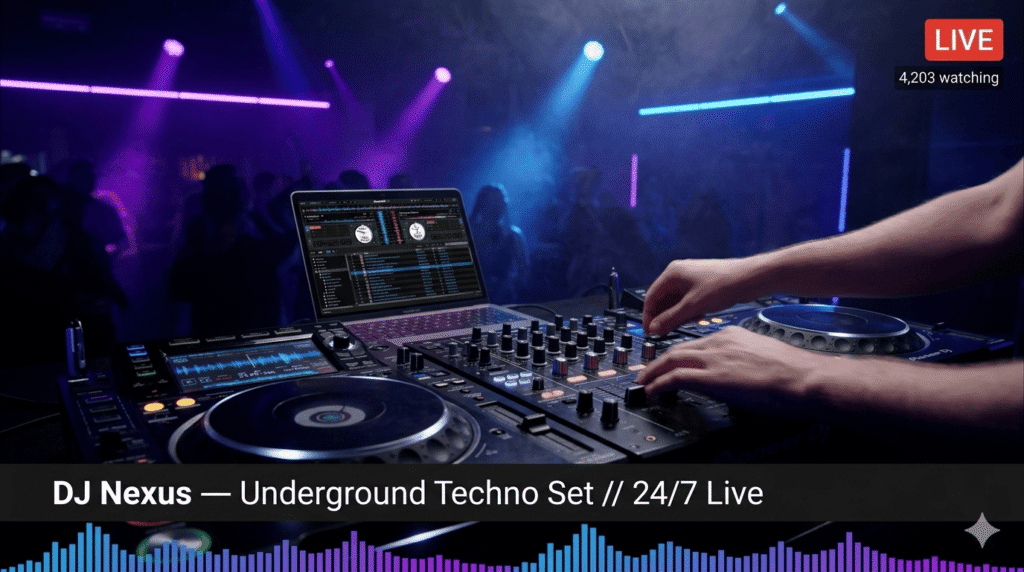
Compile your set or multiple sets into a single loop video. 2–4 hours of varied content is ideal. Add DJ identity cards between sets (“DJ Nexus — Underground Techno” + tracklist). Export: 1080p H.264, AAC 320 Kbps, 4,500–6,000 Kbps video bitrate.
Step 4 — Set Up YouTube and StreamKite
Create a persistent stream in YouTube Studio. Title it clearly: “DJ Nexus — Underground Techno 24/7 Live Stream.” Get your StreamKite PassKey at streamkite.live, upload your compiled set, paste the stream key, and launch. Your DJ channel runs 24/7 — no hardware required on your end.
How to Protect Your DJ Stream From Copyright Takedowns
Use original productions. Original music, original edits, and bootleg remixes you produced personally are the cleanest path to takedown-free streaming. Many of the most successful DJ channels on YouTube are producer-DJs who primarily play their own catalog.
Work with independent labels that have YouTube deals. Many underground electronic music labels have explicit YouTube streaming permissions for their artists and DJs they work with. If your sets include music from these labels and they’ve cleared streaming, your sets are protected.
Submit a dispute if a wrongful Content ID claim is filed. Content ID is automated and makes mistakes. If a track in your set is claimed and you have proper licensing, submit a dispute through YouTube Studio with your license documentation. False claims are overturned regularly.
Monitor your stream in the first 30 minutes after launching. Content ID claims usually appear quickly. If you’re going to have a takedown problem with your current set, you’ll know within the first half hour — which gives you time to address it before the stream builds a viewing audience.
Comparison Table: Best DJ Streaming Platforms
| Platform | Audience Size | Rights Issues | Monetization | 24/7 Auto-Loop | Discovery |
|---|---|---|---|---|---|
| YouTube + StreamKite | Largest | Medium (Content ID) | ✅ Strong | ✅ Yes | ✅ Excellent |
| Twitch | Large | High (VOD muted) | ✅ Good | ❌ No | Limited |
| Mixcloud Live | Medium | ✅ Low (licensed) | Limited | ❌ No | Medium |
| Facebook Live | Large | High (aggressive) | Limited | ❌ No | Declining |
| Kick | Small-Medium | Low currently | Basic | ❌ No | Growing |
FAQ — Live Streaming for DJs
1. What music can I safely play in a DJ stream on YouTube?
Original productions, music from independent labels that have cleared YouTube streaming, royalty-free music from licensing platforms like Artlist or Epidemic Sound, and tracks from labels with explicit YouTube content partnerships. Commercial tracks from major labels will typically be detected by Content ID and either claimed or taken down.
2. Can I stream on multiple platforms simultaneously as a DJ?
Yes. Using a multi-streaming service like Restream or Yellow Duck, you can push your stream to YouTube, Twitch, and other platforms at the same time. Note that each platform’s rights policies apply independently — a set that’s safe on Mixcloud may be flagged on YouTube, and vice versa.
3. Does Mixcloud’s license cover my DJ mixes on their platform?
Mixcloud has licensing agreements that cover their platform specifically. This means your DJ mixes can be played on Mixcloud without individual track permissions. These licenses do not extend to YouTube, Twitch, or any other platform — they only apply to content hosted on Mixcloud.
4. How do I build a DJ audience on YouTube from scratch?
Start with a 24/7 loop stream of your best sets — this keeps your channel visible in YouTube search and recommendations at all hours. Upload individual sets and mixes as separate videos as well. Promote in DJ communities on Reddit (r/DJs, genre-specific subreddits), Discord servers, and social platforms. Collaboration with other DJs for shoutouts and features accelerates growth in the early phase.
5. What equipment do I need for a professional DJ live stream?
At minimum: your DJ setup (CDJs/turntables + mixer or a controller), a capture card or audio interface to get your mix signal into your computer, and a camera if you want to include your performance visually. For a high-quality video stream: a dedicated camera (Sony ZV series or similar), proper studio/stage lighting, and a clean backdrop or club environment.
6. Can I monetize a DJ channel on YouTube?
Yes, once you reach YouTube Partner Program thresholds (1,000 subscribers, 4,000 watch hours). Channels that play original music or properly cleared tracks can enable full monetization. Channels with frequent Content ID claims may have monetization limited or redirected to rights holders. Super Chats during live events, channel memberships, and merchandise are additional revenue streams that aren’t affected by Content ID.
7. Is it worth starting a YouTube DJ channel in 2026?
Yes — particularly in genres that are underserved on YouTube. Deep house, techno, drum and bass, ambient electronic, and regional dance music genres all have audiences actively searching YouTube for continuous streams and DJ sets. The key is rights-compliant music and a consistent streaming setup that keeps your channel live around the clock.
8. What’s the best time to go live as a DJ for maximum viewers?
For a 24/7 automated loop stream, timing doesn’t apply — the stream is always live. For scheduled interactive sets, Friday and Saturday evenings in your primary audience’s time zone consistently show the highest concurrent viewers for music streams across all platforms. Announce scheduled live performances at least 48 hours in advance on social media to drive viewership.
Start Your 24/7 DJ Channel Today
The DJ channels winning on YouTube in 2026 aren’t just going live occasionally. They’re building permanent presences — 24/7 streams that accumulate watch time, attract algorithm recommendations, and grow audiences while the DJ is off doing anything else.
StreamKite lets you run a 24/7 live stream from any device without keeping your PC on. No technical knowledge needed. Setup takes under 5 minutes.
Start your 24/7 loop stream today
Run a nonstop YouTube live stream from any device.
No PC required. No technical knowledge needed.
